Oh hey, yeah it’s been a while, I know. But guess what? It’s like, here. For real.
While we’ve been pumping out beautiful and effective websites for great clients for 18 years now, we’ve tended to put our own site redesigns on the back burner. Sorry/not sorry about that, truly.
The flip side of that coin, however, is that in the years since we’ve updated the old digital cave, WordPress has made some impressive leaps and bounds in both technology and usability. The Ogres have learned some new tricks, too, and we’re proud to show them off here in our new site.
Like what you see? Let us know! When you’re ready for that brand-new-website-feeling at your organization, we’re here to help.
While the percentage of spam emails has decreased slowly over the last decade, from ~57% to around 46%, there are still ~160 billion spam emails sent every day. So, if your inbox is less than half spam, you can thank your spam filters!
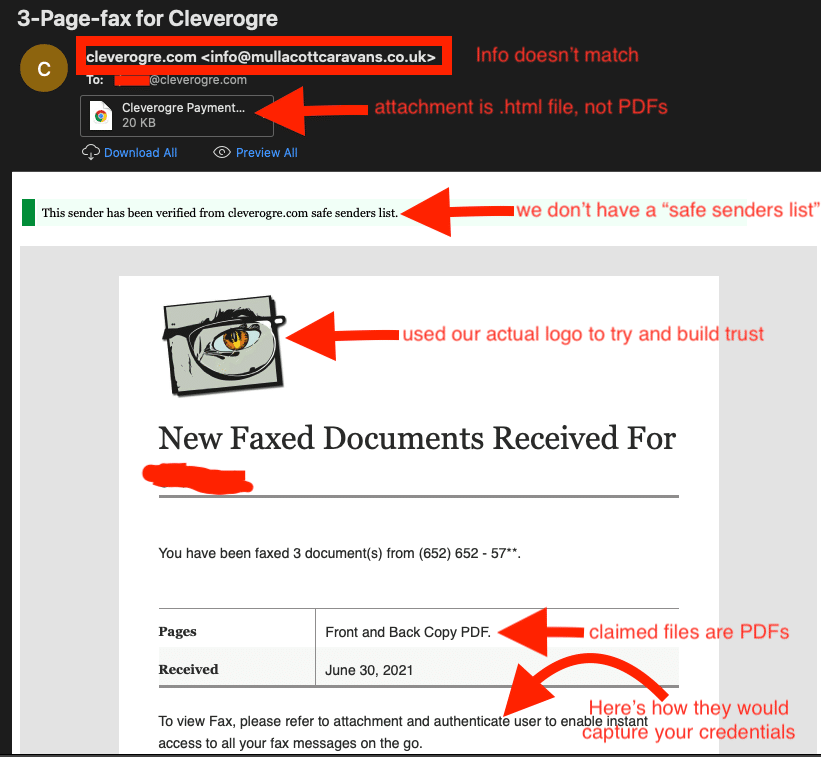
Here’s one that beat the odds and slipped its way past our security to our inboxes, and how we ID’d it as a potential scam:
We did, once upon a time, utilize a fax machine for sending and receiving documents — but that was long ago. While this wasn’t the most convincing scam attempt we saw this month, it did get a chuckle out of the Ogres.
A common tactic for scammers is to entice you to download a file that will infect your computer. Typically, the file is presented as an important message, an invoice to be paid, a purchase order, or a similar business document. This scammer attempted to get us to download something labeled “Cleverogre payment…” Spoiler alert: we didn’t download it.
When accompanied by the other hallmarks of a scam (poor spelling and/or grammar, wonky alignment, mismatched fonts, threatening scenarios, etc.), your best bet is to mark the email as spam and delete it.
Remember, Scammers Count on You Clicking!
Don’t click links in emails! Instead, look up email addresses and phone numbers for customer service, be skeptical, and listen to your spidey senses. Good Luck!
One of our highly-valued local website design and development clients, M., was experiencing a frustrating result with form notifications in her inbox: Gmail was grouping every notification from her website’s contact form into one big, unwieldy thread.
As the marketing manager of a busy renewable energy sector firm, M. received a lot of leads through the form. Organizing and searching for specific emails was taking more time than she had to spend.
M. reached out to us for advice, and we were able to come up with a quick solution, using the built-in functions of Gravity Forms, our preferred forms solution since 2016. Since she was particularly adept at managing the systems we set up on the custom WordPress website, we also provided tips on how she could refine the settings further to help her stay organized and efficient.
Good morning, M.,
Great question! You are totally on the right track: making the form notifications unique to each entry will keep them from being grouped in threads by your email client (looks like Gmail from your screenshots). Of course, you can turn off grouping emails for your whole inbox (conversation view, I think it’s called), but generally, I find grouping is a good thing — when it does what we want.
As it seems you already know, Gmail is keying in on the subject line of these emails to group them, so I added a few short codes to the Admin Notification for the Contact Form.
In the Subject Field of the Admin Notification settings, I used the “{…}” button (Insert Merge Tags) found just to the right of the field to change the following:
Old subject line: New submission from {form_title}
Since the form title doesn’t change from entry to entry, the subject text was always the same.
New subject line: New submission from {Name (First):1.3} {Name (Last):1.6} via {form_title}
This new subject line will include the sender’s name, and only emails from the same person will be grouped in your Gmail inbox.
If you need to split the emails from the same sender as well, you could add the date and time or another unique merge tag to the subject using the same method.
Over the years, web designers and developers have conjured up tons of ideas for keeping more of a website’s content “above the fold.”
Then: Avoiding Scrolling
Expanding accordions, file folder-style tabs, fading and rotating animated sliders, and many more ingenious features were created to avoid having content fall below the edges of our clunky desktop monitors. All this work was done to prevent the need for one maligned behavior: scrolling.
It was accepted as common knowledge at the time that “users don’t want to scroll.” So we did whatever we could to jam every bit of potentially engaging content into the top portion of a single screen’s height.
Now: Embracing Scrolling
In the old days when desktop PCs were the norm, this crusade made sense. Users were less likely to scroll down a page if what was first presented on the screen didn’t grab their attention. While this still holds true to a degree, the web traffic takeover by smartphone users — paired with the explosion of social media — meant users not only got used to scrolling vertical interface, they expected it.
Rather than being an obstacle, scrolling quickly became the default behavior for users. Swiping on a screen to find what you’re looking for is now second nature — while finding and tapping tabs, links, or buttons to show hidden content seems like a chore.
But: Exceptions to the Rule
Now that doesn’t mean there aren’t some cases where it makes sense to display a small amount of content and hiding the rest until it’s called upon. For example, showing different messages for different audiences at the same stage of the user journey is a good idea. Similarly, displaying different info for separate versions of a product or service can avoid confusion and help drive conversions.
To Scroll or Not to Scroll
So when should you embrace scrolling vs. hiding non-essential information? As is often the case, it depends. When speaking to a specific targeted audience about a topic they are interested in, let everything show. Use standard layout elements like subheadings, bulleted lists, images, captions, and call-outs to break up the content and avoid the dreaded “wall of text” effect.
By contrast, if you have clearly delineated sections of information aimed at different audiences or discussing different services or products, try out some tabs, accordions, sliders, or other ways to focus the website visitor’s attention where you want it.
Recently, a client contacted us when, shortly after launching their new site, the boss complained that his otherwise excellent new website seemed to take a really long time to load. After running some tests and checking configurations, we reported that everything was in the green on our end, which left a few likely culprits in the journey between our hosting servers and her boss’s cell phone. Here’s what we told her:
Good afternoon,
Thanks for letting us know! As I’m sure you understand, the experience a user has with a slow website can be caused by many things.
To test our side of the equation, we ran speed tests with several tools, and they all gave glowing reports on the website’s speed. I like PageSpeed Insights from Google: https://pagespeed.web.dev
Other sources of slowdowns that we can’t check or control include issues with the ISP or local network used to access the site; the user’s device, including software, settings, and issues like unapplied updates; and temporary spikes in local, network, server, or even individual webpage traffic. The website also slows down temporarily as updates to the WordPress core, plugins, and theme are performed a few times a month, but these typically only take a few seconds up to a few minutes.
If you get additional complaints, supplying as many of the following details as possible can help us pinpoint what is happening — if the issue is caused by the website and not one of the other factors:
Date and time of the issue
Full URL(s) of the page(s) accessed on the website
User’s device information:
Make and model of device
OS and version
Browser and version
Screenshots/recordings of the issue as it is happening
We realize it can be difficult to gather this type of information after the fact, but the more you can supply, the better we can help.
Ever hear clients say they tried to call you on a disconnected phone number they found online? Need to make sure Google Maps sends traffic to your front door instead of a competitor?
Well then, have we got good news for you, friend: CleverOgre is now offering Listings Management to help with all of this and more!
Remember when we used phone books to look up phone numbers and addresses for businesses? Back then, a listing in those fat, yellow behemoths was all that was needed to be found by customers. When a business moved or changed phone numbers, we simply contacted Ma Bell and let her know the details. Easy-peasy.
These days, the internet and powerful mobile devices have made phone books obsolete. Customers simply whip out their phones to see who offers what they’re looking for. Within a click or two, they can see where you’re located, how to contact you and what other people have to say about your customer service.
The trouble is, not all of the information out there is accurate
Online directories — specialized services that gather phone numbers, addresses and other information about businesses — often pick up and distribute bad info. Old addresses or phone numbers from previous locations, mistaken entries, even bad reviews of other companies from confused customers can end up attached to your business name.
Thankfully, we have a solution to these problems and more: Listings Management from CleverOgre.
What Can Listings Management Do for Your Business?
Listings Management helps customers trust your business
Studies show that 73% of consumers say they lose trust in a business when they find incorrect or conflicting information online. Since nearly 40% of business listings in online directories contain errors, this results in an estimated yearly loss of nearly $10 billion in sales.
When online information is complete and correct, more people can find you and become paying customers. In fact, customer confidence nearly doubles when listings include additional information such as hours of operation, ratings, photographs, menus and product descriptions.
Listings Management is a crucial facet of successful SEO efforts
Search engines like Google, Bing and Yahoo comb through online directories for contact and location information to display in their search results. When they find conflicting addresses, phone numbers or website URLs for your company, the search engines are less confident about serving up your business as a trusted result.
Listings Management Lets You Stay Focused on Running Your Business
When you sign up for Listings Management with CleverOgre, we start by scouring more than 100 of the top digital services. We make sure they all have the correct name, address, phone number and website for your business. If we find any errors, we’ll repress the bad info and make sure the listings are updated with accurate information.
Even better, once we’ve gone through the directories and streamlined your listings we lock them down to make sure they stay accurate. We run scans 24/7 to find new information that doesn’t match — and we keep it from being distributed. We also get alerts for new reviews of your business, so you can stay on top of your online reputation.
But wait, there’s more! As a trusted listings management provider, CleverOgre can tell the search engines even more about who you are, what you sell and what services you provide with Enhanced Listings. We add the photos you want shown in search results, links to your website and even add information about any specials or promotions you’re running. Pretty cool, right?
Want to Take a Free Peek at Your Current Listings?
Of course you do! Simply fill out the following form, and within seconds, you’ll get a look at what information is out there about your business. This quick review will show the info a few of the top online directories are serving up, including any missing or mismatched entries.
Every once in a while, we hear a potential customer voice concern over our use of WordPress. We’re here to set the record straight on why WordPress is our CMS of choice for security, functionality, and ease-of-use.
Why CleverOgre Says “Yes” to WordPress!
When we build custom, responsive websites for our clients, we use WordPress. If this surprises you, chances are you have an inaccurate or outdated opinion of this wildly popular Content Management System, or CMS.
To be fair, in its fledgling days, WordPress was a little like the Wild West: Outlaw coders produced themes that were as likely as not to contain hidden malware, trojans, and viruses. Plugins of dubious character wandered the darker corners of the internet, waiting to cause havoc and bring e-commerce sites to their knees. Charlatans and quacks hawked templates that rarely did what they claimed, hiding their flaws behind snazzy yet useless animations that slowed browsers to a crawl.
The Golden Age of WordPress
See that big blue slice of the CMS-usage pie? Yeah, that’s WordPress. Data courtesy of Builtwith.
Thankfully, that is no longer the case — at least not when WordPress is set up properly and maintained by a skilled team of coders and designers! Today, this venerable conglomeration of open source gold has evolved to become the most-used CMS in the world. As of 2025, more than 26% of the sites on the internet use WordPress. Yes, 26% of THE WHOLE ENTIRE INTERNET! That’s over a quarter of a BILLION sites! When you only include websites using a known CMS, that number jumps to 32%. And every indication shows that these numbers are going to keep on growing for the foreseeable future.
So, the big question is, “Why?” What has attracted so many website developers, a notoriously finicky bunch, to jump on the WP bandwagon? To put it simply, it’s what we call the WordPress Golden Triangle of Awesomeness*: It’s Open Source, Easy, and Widely Used.
WordPress is Open Source!
WordPress is arguably one of the most successful implementations of open source software in history. As the term “open source” implies, the source code at the core is not fiercely guarded by any single company, where incremental upgrades are doled out slowly to maximize profits. Instead, it is made available to anyone who wants to download the CMS and start banging out web pages.
This allows developers to keep timelines reasonable by eliminating the need to start from square one with every project. When using the solid, stable foundation of WordPress, designers and developers are free to put their talents into making great-looking sites that are effective and efficient.
WordPress is Easy!
From its inception, WordPress was designed to be easy for the end user to create and share content. Initially conceived as a bare-bones blogging platform, the dashboard and editing features are simple and intuitive. If you can use that ubiquitous word processing software found on most PCs, chances are you’ll quickly figure out what to do when you log in to a WordPress site.
Gutenberg, the new native WordPress block-based editing system, makes creating and editing engaging layouts a breeze. With a quick training session, most of our clients go on to update their own sites without difficulty. Of course, if they DO run into trouble, the CleverOgre team is here to help.
WordPress is Widely Used!
Thanks to the worldwide community of developers and software engineers who are constantly creating, testing, and sharing their individual tweaks, changes, and upgrades, WordPress is constantly at the top of the CMS game. When an especially useful feature is identified, it becomes part of the core software that is then shared with everybody who installs the latest update.
Likewise, there are many thousands of individuals who are constantly poking and prodding the CMS to identify vulnerabilities. Flaws are uncovered and fixes are created at an amazing speed, often before the website-using world at large is even aware of the issue. This leads to an incredibly robust and resilient piece of evolving software, beholden only to a communal desire to improve. Unlike proprietary software that may sit for years without being analyzed or tested for issues until it is hacked to pieces, WordPress is ruthlessly subjected to the attention of white-hat hackers and security professionals on a daily basis.
So, Why Do I Hear So Many Bad Things About WordPress?
Despite all the things we love about WordPress, there are caveats. Most of the bad publicity around this great CMS has its roots in the following causes:
Wide-Spread use of Templates
There are plenty of web companies that simply grab a cheap template from the marketplace and start plopping in their customers’ content. This is not to say that all templates are bad; in fact, we’ve seen a very select few that were pretty darned great. However, if you are looking for an original-looking site that sets you apart from the competition, templates are not the way to go. We come across many sites where the (cough, cough) “developers” didn’t even bother to change the default colors, text or other settings (ever seen a “Hello World!” blog post?).
Bad Plugins Are Everywhere
WordPress allows developers to quickly add functionality by using plugins. As you might expect, there are plugins of high quality and plugins of low quality. When a site is built with untested, outdated, or abandoned plugins (see the next section for more on updating), chances are you’re going to have a bad time. Similarly, we see a lot of very slow websites that are jam-packed with duplicative plugins and visual builders that add a lot of bloat with little benefit to the end user.
Updates Not Installed
As we mentioned earlier, the WordPress community is fantastic about rooting out issues and identifying vulnerabilities. Fixes and patches for these problems are included in frequent updates to plugins as well as the WordPress core. However, these updates need to actually be installed to take effect. When sites sit for months or even years without getting updated, they slowly break down and eventually become sitting ducks for hackers.
WordPress + CleverOgre = Great Sites
That’s where we come in: CleverOgre uses WordPress responsibly. We provide managed hosting and keep all of our WordPress sites and plugins updated, protecting our clients quickly and quietly behind the scenes. Rather than using templates, we develop all our own themes in-house, each one custom-designed for our individual clients.
We include only the options, features, and plugins that are necessary to keep our sites lightweight and nimble. Speaking of plugins, we pay for high-end licenses for top-quality plugins that are stable and enjoy cross-browser support. In the rare occasions when the plugins we use become outdated or are abandoned by their creators, we find new ones and make sure they work properly for our clients’ sites.
We also include additional security measures on our sites, such as non-standard admin login pages and hiding file information. Our websites prevent known hacker IPs from accessing the domain, add CAPTCHA to contact forms, block suspicious logins, and enforce rate limiting to keep the security risk to our clients’ sites to a minimum.
We Love WordPress, and You Will, Too.
So that’s the scoop! We love WordPress, and our clients do, too. Give us a call and see how the winning combination of WordPress + CleverOgre can work for your business!
In the mid-1400s, Johaness Gutenberg changed the world in a profound way with his printing press.
Rather than the laborious practice of writing by hand, his movable type and mechanical reproduction allowed for the quick printing and widespread distribution of written materials for the first time in the Western world. The latest built-in editor for WordPress is named after this man and his invention, and after using it for a few years now, it’s easy to see why.
Classic WordPress vs. Gutenberg
In the classic WordPress editor, you’d typically see what looked like a page in a word processor like Google Docs or Microsoft Word. At the top of the editing page, you’d find controls for adding elements like headings, images, bulleted lists, and links, as well as simple options to style body copy like alignment, font size, colors, and bold or italics.
Adding more advanced elements to a webpage like videos, maps, and complicated layouts often required installing one or more specialized individual plugins, writing custom code, or using a website-building plugin like Elementor, WP Bakery, or Beaver Builder.
Similar to how many of those website-building plugins work, Gutenberg uses a collection of blocks to hold, style and display different types of content on a website. The number of included blocks is huge (not to mention third-party custom block libraries and the ability to create new blocks), and there are options for saving, duplicating, and reusing blocks and block patterns across pages.
Gutenberg vs. Website-Building Plugins
Gutenberg’s big advantage over website-building plugins, however, is that it is part of WordPress, not a plugin that you have to download so it can overwrite WordPress with an entirely new set of controls. This means a WordPress website built with Gutenberg has a smaller footprint so it’s faster to load, while also making it easier to edit and less prone to compatibility issues. There’s also the benefit of not needing a paid plugin to get a huge range of functions!
Learning Gutenberg: Easier Than You Might Think
If you’ve never edited a website before, the good news is Gutenberg is really user-friendly. In general, if you can see writing on your website, you can just click on the words in the editor and start typing away to make changes. Block-specific settings appear when you need them, and the editor offers multiple pathways to perform the same tasks so you can work the way you prefer. Easy peasy, lemon squeezy!
On the other hand, if you’re used to the classic WordPress editor, switching to Gutenberg might at first feel like a real challenge. Change can be difficult for most people, especially when it comes to how we work with technology. But don’t be discouraged! Gutenberg is a well-organized and powerful system and, at its core, this new editor upholds the longstanding WordPress mission of making websites easy for everybody. Once you get used to where controls are located see how easy it is to add, edit or otherwise change content on your website, we’re pretty darn sure you’ll love Gutenberg as much as we do.
Take the New Editor for a Test Drive
If you’re ready to see Gutenberg for yourself, WordPress has a nifty little webpage where you can give the controls a whirl at wordpress.org/gutenberg. If you’d like a little handholding, in our next installment of this series we’ll go over the basic Gutenberg blocks and controls, and future posts will include specifics on combining blocks and some of the more advanced options.
Gutenberg + CleverOgre = Great Websites!
If you’re ready to get your own Gutenberg website filled with all the extras and custom features CleverOgre is known for, drop us a line! We’ll listen to your needs, discuss your goals, and provide you with a plan to get a brand-spanking-new website you can be proud of showing off.